

Z7 Cordless Battery Replacement 2026: When to Replace
Written by Emily Chen · Updated August 19, 2026 · 8 min read
In This Guide
- Why Lithium-Ion Batteries Need Replacement
- 5 Signals Your Z7 Battery Needs Replacing
- 5-Step Battery Care Routine
- Temperature vs Battery Drain Table
- Do's and Don'ts for Z7 Battery Health
- 5 Pro Tips
- Frequently Asked Questions
Why Lithium-Ion Batteries Need Replacement
The FIFN Z7 wireless straightener ships with a 5000mAh lithium-ion cell that delivers up to 30 minutes of cordless styling per charge. The trade-off is that every full charge cycle slowly degrades the cell.
After roughly 800–1,000 full discharge cycles, most lithium-ion packs retain only 70–80% of their original capacity. For a daily user, that milestone arrives around 24–30 months. For a weekly user, the same milestone may take 4–5 years. The Z7's battery management system (BMS) protects against overcharge and over-discharge, but it cannot reverse the natural chemical aging inside every lithium-ion cell.

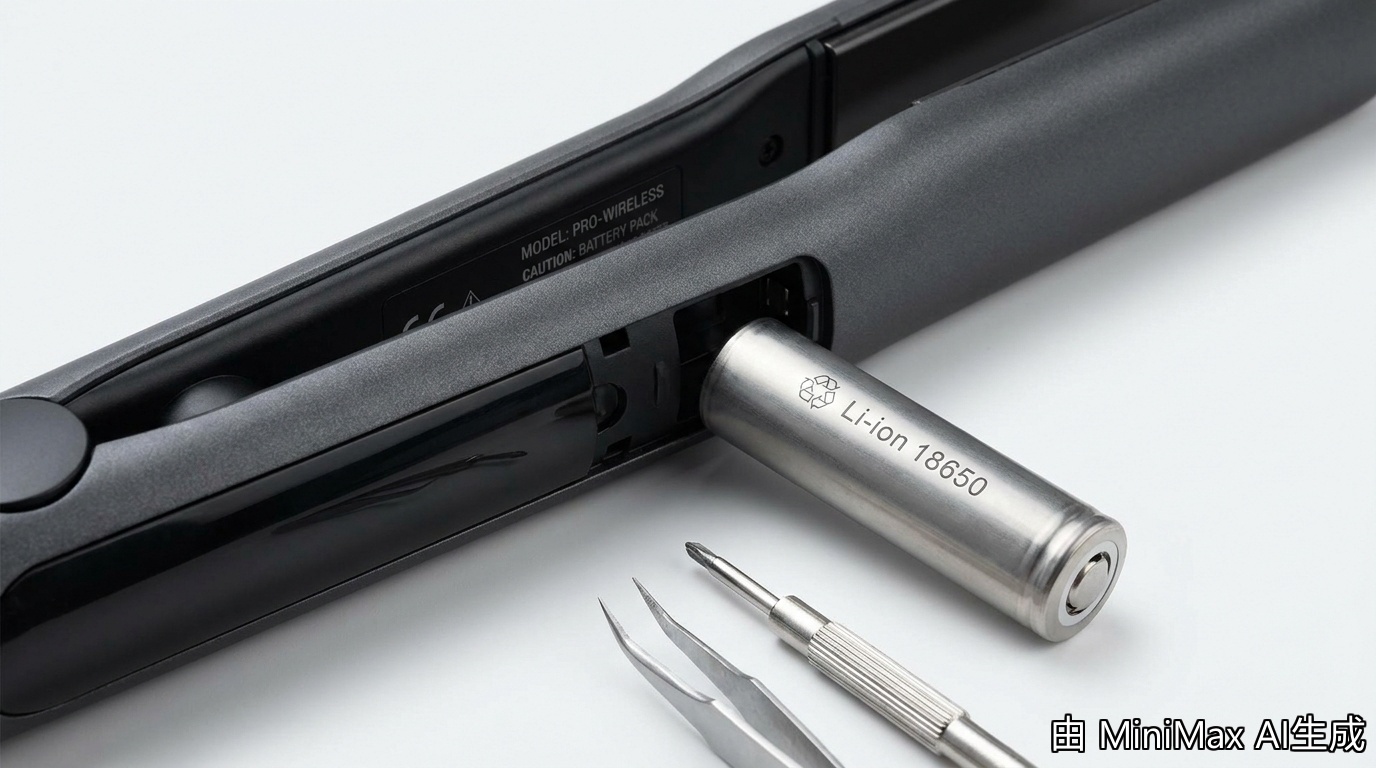
The good news: the Z7's battery is serviceable. FIFN designed the Z7 with a replaceable battery module rather than a sealed unit, so you can swap the cell instead of replacing the whole tool.
5 Signals Your Z7 Battery Needs Replacing
You don't need a multimeter to know when the Z7 battery is aging.
- Runtime drops below 18 minutes — A healthy 5000mAh cell delivers 25–30 minutes on the middle (180°C) setting. If you used to finish a full head and now barely finish one side, the cell has dropped below 80% capacity.
- The LED indicator flashes red earlier — The Z7's four-bar LED normally turns red at the 10% mark. If it goes red after 5–7 minutes instead of 20+, the cell's voltage curve is degrading.
- The tool shuts off mid-style without warning — If the Z7 dies while the LED still shows one bar, the battery's internal resistance has increased.
- The unit gets noticeably warm during charging — A hot-to-the-touch case during USB-C charging means the cell is working harder to accept current.
- The Z7 won't hold a charge overnight — A healthy Z7 loses 2–3% per day when idle. If it drops from 100% to 70% with no use, the cell has elevated self-discharge.
5-Step Battery Care Routine
The single biggest factor in lithium-ion battery longevity is depth of discharge. The Z7's battery will last far longer if you top it up after each use instead of running it to zero.
- Charge the Z7 to 80% for daily use — Lithium-ion cells degrade fastest at the top and bottom of the charge curve. Unplug at 80% (3 LED bars) to reduce stress on the cell. (Time: 1 minute decision)
- Avoid leaving the Z7 at 0% for more than 24 hours — Deep discharge followed by storage accelerates capacity loss. (Time: 1 minute)
- Use the included USB-C cable, not a high-wattage phone charger — A 65W or 100W GaN phone charger generates more heat in the cell during top-up. (Time: 30 seconds)
- Charge at room temperature, never in a hot car — Lithium-ion cells are stressed above 35°C. (Time: 1 minute to find a cooler spot)
- Run a full discharge-and-charge cycle once a month — This recalibrates the LED indicator and the BMS's runtime estimate. (Time: 30–35 minutes)

Temperature vs Battery Drain Table
| Heat Setting | Temperature | Runtime per Charge | Cycles to 80% Capacity |
|---|---|---|---|
| Low | 160°C / 320°F | 30–32 min | ~1,000 cycles |
| Medium | 180°C / 356°F | 25–28 min | ~900 cycles |
| High | 200°C / 392°F | 20–22 min | ~800 cycles |
Do's and Don'ts for Z7 Battery Health
| ✅ Do | ❌ Don't |
|---|---|
| Top up to 80% for daily styling | Drain to 0% on a regular basis |
| Charge at room temperature (20–25°C) | Leave the Z7 in a parked car above 35°C |
| Run a full calibration cycle monthly | Store the Z7 fully discharged for weeks |
| Use the supplied USB-C cable | Use a 100W GaN phone charger as a habit |
| Replace the cell below 18-min runtime | Continue using a cell that gets hot charging |

5 Pro Tips From Long-Term Z7 Users
- Track your cycle count. A notebook entry each time you charge from below 20% gives you a real estimate of where you are on the 800–1,000 cycle curve.
- Avoid the 200°C setting unless you need it. For fine, medium, and color-treated hair, 180°C handles 95% of styles and extends cell life.
- Buy a spare battery when you buy the Z7. FIFN sells replacement Z7 cells, and keeping one on hand means zero downtime.
- Recycle the old cell properly. Most electronics retailers and salons accept spent lithium-ion cells for free recycling.
- Watch the charging cable, not just the charger. A frayed USB-C cable can cause intermittent charging that confuses the BMS.
Frequently Asked Questions
Q1: How long does the Z7 battery last before I need to replace it?
For a daily user at 180°C, expect 18–24 months before the cell drops below 80% capacity. For a weekly user at 160°C, the same milestone can take 5–6 years.
Q2: Can I replace the Z7 battery myself?
Yes. The Z7 uses a serviceable battery pack secured with standard screws. You can replace the cell at home using a FIFN-authorized replacement, or use FIFN's mail-in service.
Q3: Is it bad to leave the Z7 plugged in overnight?
No. The Z7's BMS stops accepting charge at 100%, so overnight charging does not overcharge. Unplugging at 80% for daily use extends cell life.
Q4: Does cold weather hurt the Z7 battery?
Cold temporarily reduces capacity but does not cause permanent damage. Avoid charging a frozen cell.
Q5: Will a replacement Z7 battery restore the original 30-minute runtime?
Yes. A fresh 5000mAh cell returns the Z7 to its original runtime spec after two or three full charge cycles.
Why the Z7 Battery Design Matters
FIFN engineered the Z7 with a user-replaceable battery module instead of a sealed cell. That decision extends the product's useful life, reduces e-waste, and saves you the cost of replacing the entire tool when the cell ages out. The Z7's design is a quiet but meaningful sustainability win.
Style Cordless With the FIFN Z7
5000mAh battery · 90-second heat-up · 160–200°C range · 15mm ceramic plates · USB-C charging · $48.67
More cordless styling guides on fifn.cc · See the full FIFN tool lineup · Read the FIFN hair crimper blog for texture-focused tutorials.
Hair Crimper for Shag Haircut 2026: Modern Texture
Hair Crimper for Shag Haircut 2026: Modern Texture
Related Posts

Crimped Hair for Engagement Photos 2026: Volume Guide

Z7 Cordless Straightener for Men 2026: Real Grooming Test

Hair Crimper Menopause Hair 2026: Thinning Volume Guide

Z7 Rainy Day Styling 2026: Humidity Cordless Test


